


If you know how to create an event on GarageApp, you already have a head start on every organizer still wrestling with a dead Facebook post that nobody sees. A car meet lives or dies on visibility, and generic social media tends to fail car communities for exactly that reason. You can pour hours into planning a cars and coffee, pick the perfect lot, line up the coffee truck, and still end up standing in an empty parking lot at 8am because your announcement got buried under somebody's vacation photos. Listing your meet properly is the difference between ten cars and a hundred. This walkthrough covers the whole process, step by step, so let's get into it.
Step 1: Start From the Events Tab
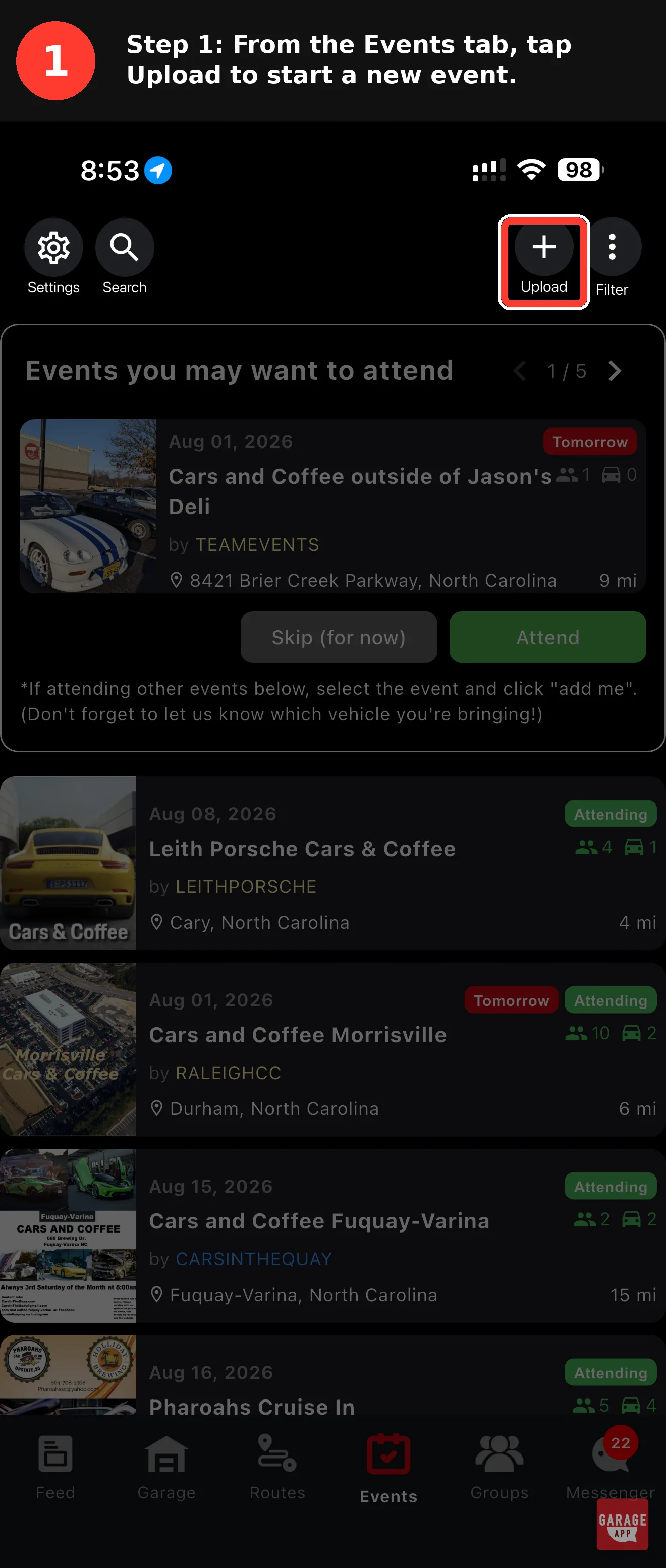
Open GarageApp and head to the Events tab. This is the hub for everything local and enthusiast-driven near you, and the same place attendees go when they want to find car events and meets near them. Look for the Upload button, usually sitting at the top of the screen, and tap it to begin creating a new event. That single tap opens the event builder. No account upgrades, no hoops. If you have ever posted a photo on any app, you already know how this feels.
Set your event up a few weeks out. The earlier it goes live, the more time nearby enthusiasts have to spot it and mark themselves as attending.
Step 2: Fill In Your Event Info
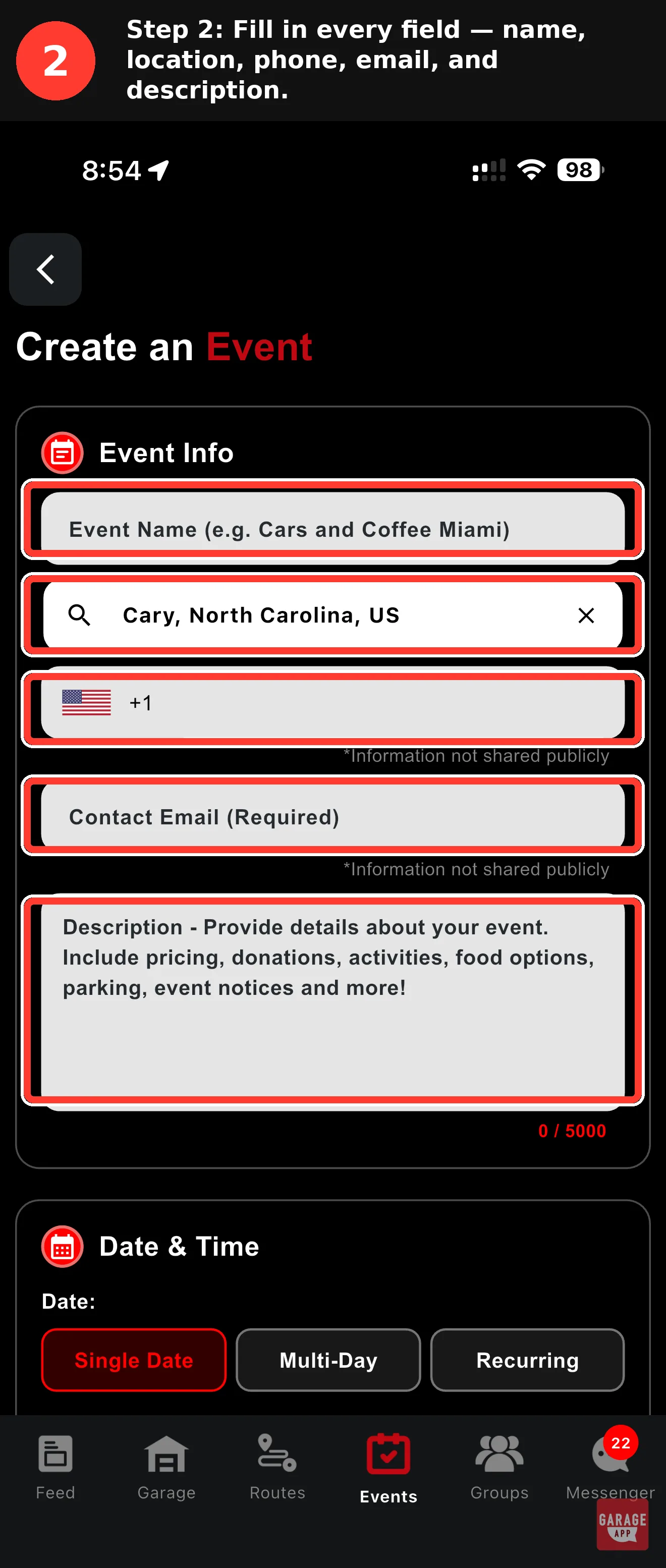
This is where you tell people what they're showing up for. Enter your event name first. Keep it clear and searchable, something like "Saturday Cars and Coffee at Riverside Lot" rather than an inside joke only your group gets. Next comes the location, and this field is searchable, so start typing the address or venue name and let it autocomplete to the exact spot.
Location matters more than any other single field. When you pin the right address, your event surfaces for people browsing meets in their area, which is exactly how local event discovery works on the platform. Get sloppy here and you'll have folks circling the wrong block while your meet fills up somewhere else.
Add your phone number, which stays private and is never shown publicly. It's there for verification and internal contact, not for random attendees to blow up your phone. Then enter your contact email, which is required. That's the line organizers can reach you on if there's a question about the listing.
Double-check the pin on the map before moving on. A meet listed one street over from where it actually happens is the fastest way to lose walk-up attendance.
Step 3: Set Your Date and Time, Add Photos
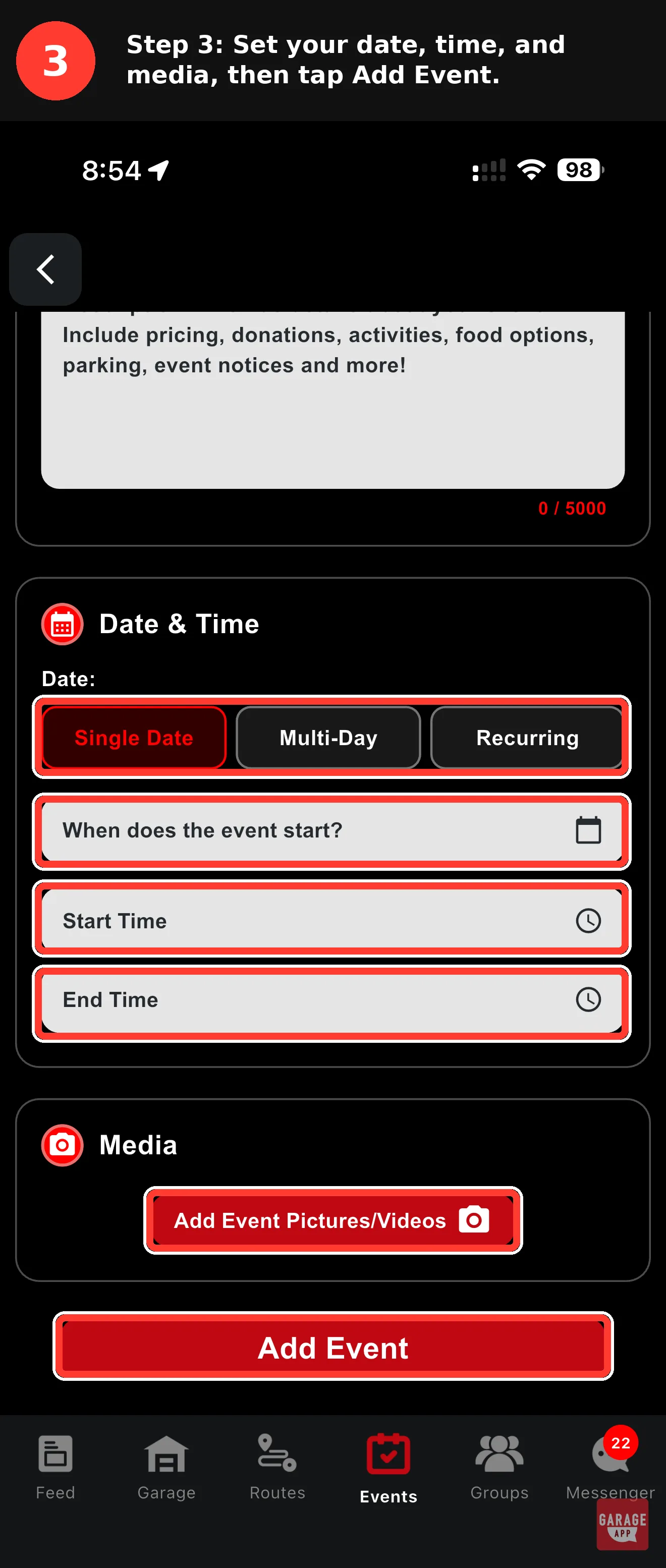
Now pick how your event runs. GarageApp gives you three choices: Single Date for a one-off, Multi-Day for weekend shows or rallies, and Recurring for anything that happens on a schedule. If you run a weekly or monthly meet, choose Recurring. It saves you from rebuilding the same listing over and over, and it keeps your regulars in one place instead of scattered across a dozen duplicate posts.
Set your start time and end time. Be realistic here, because the golden hour of any cars and coffee is usually the first ninety minutes, and people plan around what you list. Then upload a cover photo. This is the image that sells the scroll, so use something with real cars in real light, not a stock photo of a steering wheel. A great shot from last month's meet works perfectly, and if you want it to really pop, our car meet photography etiquette guide covers how to get the shot the right way.
Once everything looks right, tap Add Event. That's the button that pushes your listing live.
A recurring listing turns a one-time meet into a standing appointment your community actually plans their weekends around.
GarageApp organizer tips
Step 4: Your Event Goes Live
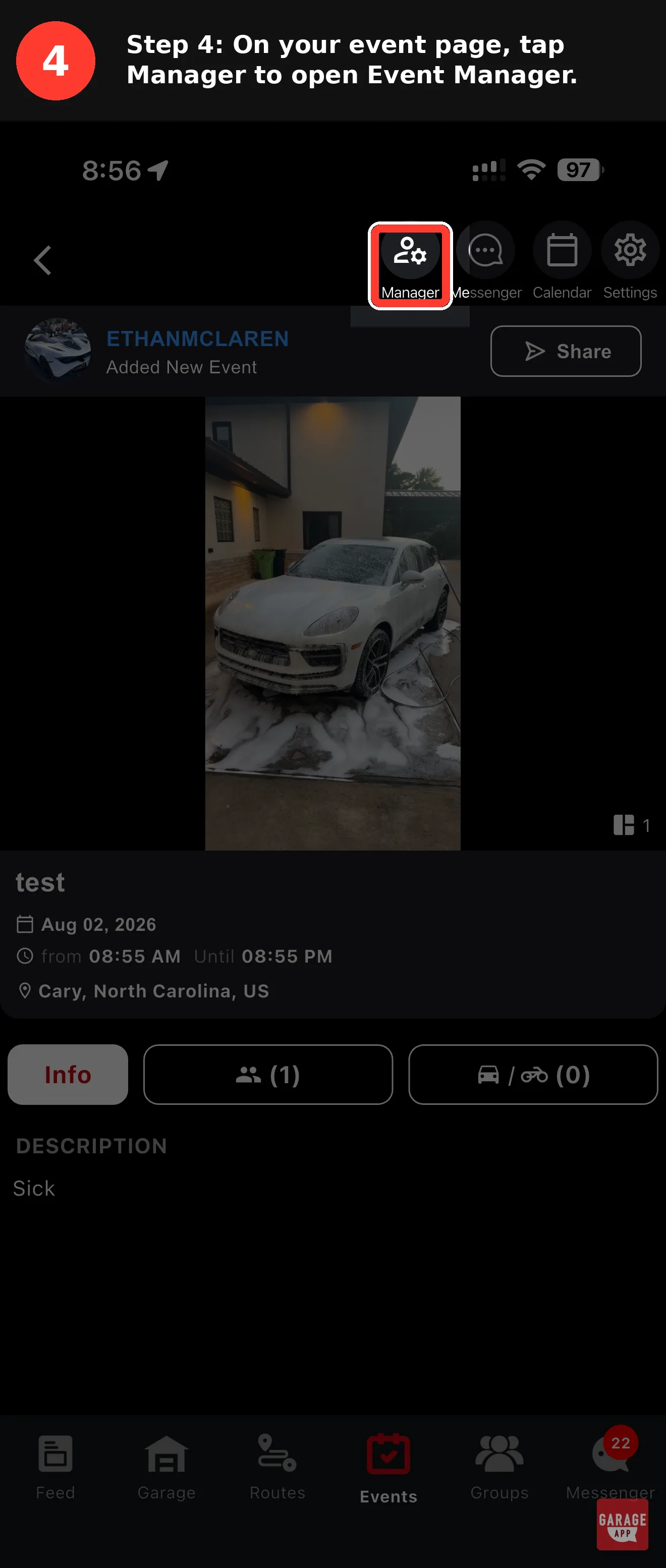
The moment you tap Add Event, your listing publishes and you land on the live event page. This is what attendees see: your cover photo, the name, the date and time, and the location, all laid out clean. Across the top you'll notice a row of shortcuts built for organizers. There's Manager for your promotion and control tools, Messenger for talking to attendees, Calendar for scheduling, and Settings for editing details.
This is also the moment your meet becomes part of the wider community feed. People browsing meets nearby can now find it, tap in, and see the details without ever messaging you first. If you want to understand how this fits into the broader scene, our guide on the different flavors of cars and coffee is worth a read before you start promoting, and if this is your first time organizing, the cars and coffee beginner's guide is a solid primer too.
Step 5: Open Event Manager
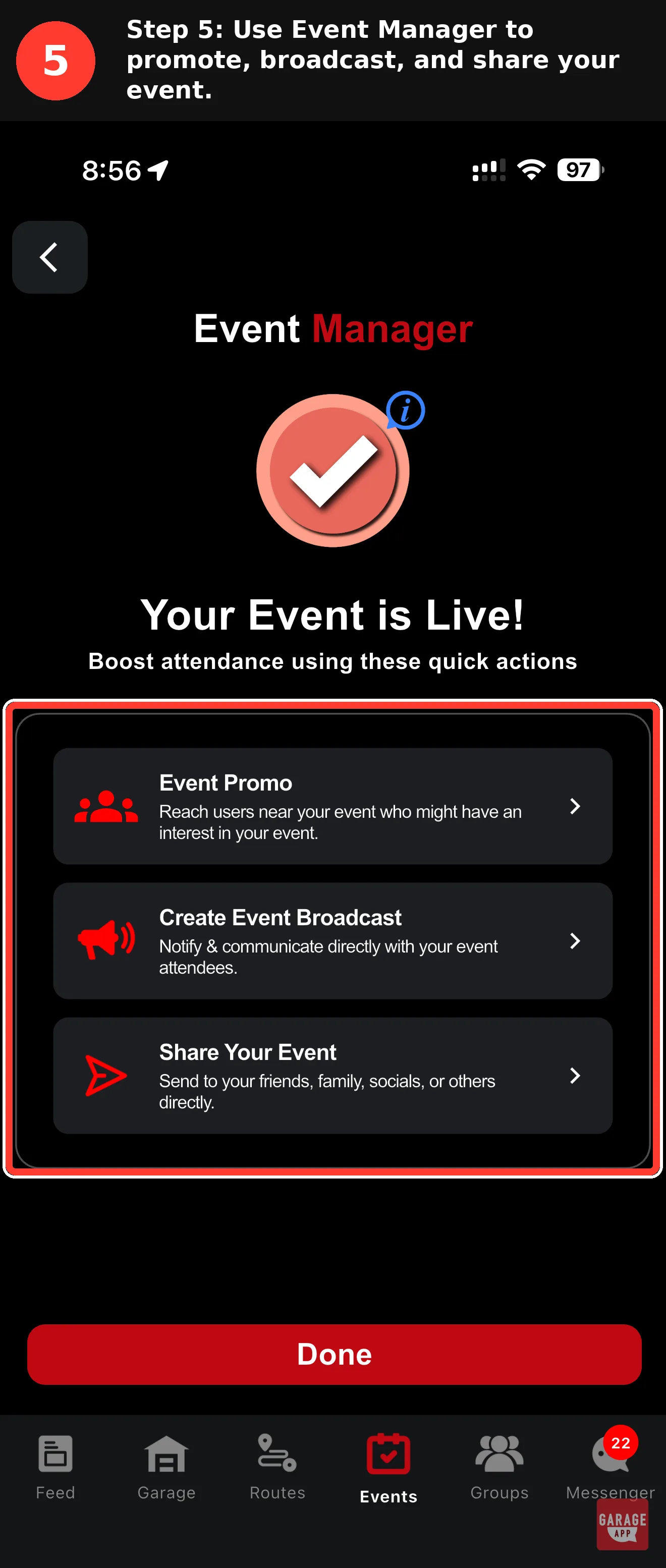
Tap Manager from that top row of shortcuts. Think of this as the control room for your meet. Everything that actually helps your event get seen and grow lives here. A lot of organizers post a listing and stop, then wonder why turnout is flat. The people who fill their lots are the ones who spend two minutes in Manager doing the work most others skip.
Inside Manager you'll find a set of Quick Actions built specifically for driving attendance. That's where we're headed next.
Step 6: Use the Quick Actions to Boost Attendance
This is where a good meet becomes a packed one. GarageApp gives you three Quick Actions inside Manager, and each does a different job.
- Event Promo pushes your listing to nearby users who are likely to be interested based on their location and the kinds of cars and meets they follow. This is how you reach enthusiasts who don't already know you exist.
- Create Event Broadcast sends a message to everyone already marked as attending. Perfect for a weather update, a last-minute location note, or a reminder the night before.
- Share Your Event hands you a direct link to send to friends, family, group chats, or your social profiles.
Event Promo is the standout here. Reaching people who are physically close and genuinely into cars is the whole reason finding attendees near you works better than shouting into a general social feed. A broadcast keeps your committed crowd locked in, and a share link lets your regulars spread the word for you. Use all three and your turnout stops being a guessing game. If you are trying to build a real crowd over time, our guide on building a car enthusiast community goes deeper on turning turnout into a regular scene.
Send one broadcast when the event goes live and another the evening before. Two well-timed nudges beat five spammy ones every time.
That's It, Your Meet Is Live
Once your event is published and promoted, something quietly powerful happens. Attendees can see who else is coming before they even show up. Somebody spots three E46s and a Singer on the attendee list and suddenly a maybe becomes a definite. That visibility is the entire point. It turns a listing into a reason to be there. Set it up right, spend a couple minutes in Manager, and let the community do the rest. If you want the full picture of the scene you are building for, our complete guide to car meet culture is the cornerstone to bookmark. And if a meet is not quite what you are after, the same tools work just as well when you start a car club.